搜尋本站文章
2016-03-11
免費授權(Migrate from Oracle with free licenses):將 Oracle 移轉到 SQL Server
Microsoft CEO Satya Nadella 在 New York 與客戶分享「Data Driven」
其中一項:免費授權(Migrate from Oracle with free licenses):將 Oracle 移轉到 SQL Server
注意事項
Software Assurance subscription required. Some restrictions may apply.
Limited time offer—free training and subsidized deployment services available until June 30 2016.
1. 需要簽署「軟體保證(Software Assurance)」,與部分限制。
2. 在2016/06/30之前,提供免費教育訓練並且補助部署服務。
就來這裡登記,獲得免費授權來移轉到 SQL Server!
I’m ready to break free from Oracle and claim my SQL Server offer
https://info.microsoft.com/Migrate_your_oracle_apps_to_SQL_Server-Contact_Me.html
參考資料
Follow the leader and migrate from Oracle to SQL Server—with free licenses*
https://www.microsoft.com/en-us/server-cloud/sql-license-migration.aspx
I’m ready to break free from Oracle and claim my SQL Server offer
https://info.microsoft.com/Migrate_your_oracle_apps_to_SQL_Server-Contact_Me.html
Put The Business Back In Your Data Management Business Case
https://info.microsoft.com/Put_the_business_back_in_your_business_case-Register.html?ls=Website
Microsoft Courting Oracle Users with SQL Server 2016
https://redmondmag.com/Articles/2016/03/10/SQL-Server-2016-Oracle.aspx?Page=1
2012-03-19
新手學SQL Server 2008使用 OPENDATASOURCE、OPENROWSET 資料表函數或連結伺服器來連接 Oracle 資料庫
本文將討論三項主題,分別是:
使用 OPENDATASOURCE、OPENROWSET 資料表函數或連結伺服器(Linked Server) 來與 Oracle 執行個體連接的設定與相關注意事項。
示範環境:
1. Windows Server 2008 R2 x64 + SQL Server 2008 R2 SP1 x64 版本。
2. Oracle 11g R2 x64 版本。
請參考以下的網址:
新手學SQL Server 2008使用 OPENDATASOURCE、OPENROWSET 資料表函數或連結伺服器來連接 Oracle 資料庫
使用 OPENDATASOURCE、OPENROWSET 資料表函數或連結伺服器(Linked Server) 來與 Oracle 執行個體連接的設定與相關注意事項。
示範環境:
1. Windows Server 2008 R2 x64 + SQL Server 2008 R2 SP1 x64 版本。
2. Oracle 11g R2 x64 版本。
請參考以下的網址:
新手學SQL Server 2008使用 OPENDATASOURCE、OPENROWSET 資料表函數或連結伺服器來連接 Oracle 資料庫
2012-03-04
下載與安裝 SSMA v5.2 (SQL Server Migration Assistant),SSMA for Oracle 為例
SSMA 是一款免費的升級移轉工具。
可以自動化的執行:移轉評估分析、結構描述與 SQL 陳述式的轉換、資料的移轉,以及移轉測試等功能。
SSMA(SQL Server Migration Assistant) 可讓您輕鬆地從 Oracle、Sybase、MySQL 和 Access 移轉資料到 SQL Server 以及 SQL Azure。
效率化和簡化您企業的移轉 — 讓處理程序更符合成本效益,並且增加您企業的生產力。
-- 01_發行SSMA 5.2版本
-- 02_可以移轉的資料庫類型
下載 SSMA 的網址:
Microsoft SQL Server Migration Assistant for Oracle v5.2
http://www.microsoft.com/download/en/details.aspx?id=28766
版本:5.2
發行日期:2012/01/29
-- 03_下載SSMA 5.2
支援的 Oracle 版本:
Oracle 7.3 或之後的版本。
支援的 SQL Server 版本:
SQL Server 2005、2008、2008 R2 以及 SQL Server 2012。
-- 04_SSMA支援移轉的資料庫系統之類型
SSMA 5.2 提供以下重大的改進:
(1) 支援 Oracle 的 %ROWTYPE parameters with NULL default 轉換。
(2) 支援 Sybase 的 Rollback Trigger。
(3) 支援更佳的 Access Linked Table 之安全認證。
在 SSMA 5.2 版本,有兩個安裝程式檔案:
SSMA for Oracle 5.2.exe 與 SSMA for Oracle 5.2 Extension Pack.exe。
(1) SSMA for Oracle 5.2.exe。
這是 SSMA 用來與 Oracle Client 連線溝通用的程式。
(2) SSMA for Oracle 5.2 Extension Pack.exe。
這個 Extension Pack 包含了:
模擬 SQL Server 所不支援的 Oracle 功能、SSMA 執行測試功能用的資料庫與應用程式、以及方便執行資料移轉的應用程式。
實作練習:下載與安裝 SSMA v5.2 (SQL Server Migration Assistant),SSMA for Oracle 為例
準備工作:
請先安裝好 Oracle Client;而這應該與要執行移轉的 Oracle 執行個體是相同或是更新的版本。
示範環境:
(1) SQL Server 2008 R2 x64 版本,已經安裝好 Oracle Client。
(2) Oracle 11g R2。
工作一:下載與解壓縮 SSMA v5.2
步驟01. 下載 SSMA v5.2,解壓縮此檔案:SSMA for Oracle 5.2.zip。
-- 05_SSMA for Oracle 5.2_zip檔案
-- 06_解壓縮後的檔案
在上圖 6 中,可以觀察到兩個檔案:SSMA for Oracle 5.2.exe 與 SSMA for Oracle 5.2 Extension Pack.exe。
工作二:執行與安裝 SSMA for Oracle
步驟01. 使用檔案總管,執行檔案:SSMA for Oracle 5.2.exe。
-- 07_SSMA for Oracle 5.2
步驟02. 在「SSMA for Oracle Setup」視窗,點選「Next」。
-- 08_在「SSMA for Oracle Setup」視窗
步驟03. 在「End-User License Agreement」視窗,點選「I accept the agreement」,點選「Next」
-- 09_在「End-User License Agreement」視窗
步驟04. 在「Usage Report Settings」視窗,點選「Next」。
-- 10_在「Usage Report Settings」視窗
步驟05. 在「Choose Setup Type」視窗,點選「Typical」,點選「Next」。
-- 11_在「Choose Setup Type」視窗
-- 12_若點選Custom_可以看到安裝的元件
步驟06. 在「Ready to Install」視窗,點選「Install」。
-- 13_在「Ready to Install」視窗
步驟07. 在「SSMA for Oracle Installation Complete」視窗,點選「Finish」。
-- 14_在「SSMA for Oracle Installation Complete」視窗
工作三:安裝 SSMA for Oracle Extension Pack
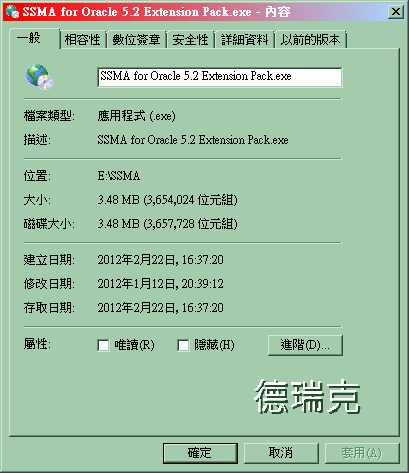
步驟01. 使用檔案總管,執行檔案:SSMA for Oracle 5.2 Extension Pack.exe。
-- 15_檢視安裝程式檔案_SSMA for Oracle 5.2 Extension Pack
步驟02. 在「SSMA for Oracle Extension Pack Setup」視窗,點選「Next」。
-- 16_在「SSMA for Oracle Extension Pack Setup」視窗
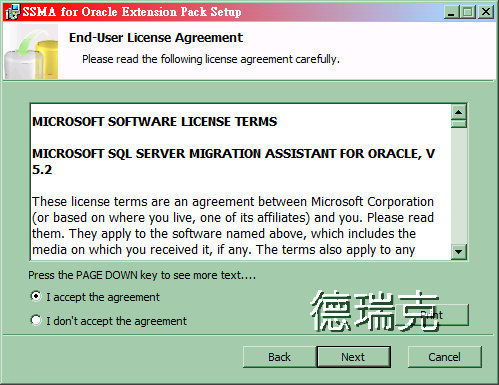
步驟03. 在「End-User License Agreement」視窗,點選「I accept the agreement」,點選「Next」。
-- 17_在「End-User License Agreement」視窗
步驟04. 在「Choose Setup Type」視窗,點選「Typical」,點選「Next」。
-- 18_在「Choose Setup Type」視窗
-- 19_若點選Custom_可以看到安裝的元件
步驟05. 在「Ready to Install」視窗,點選「Install」。
-- 20_在「Ready to Install」視窗
步驟06. 在「Completed the first step of installation」視窗,點選「Next」。
-- 21_在「Completed the first step of installation」視窗
步驟07. 在「Choose database instance from the list below」視窗,下拉選擇目標的 SQL Server 執行個體,點選「Next」。
-- 22_在「Choose database instance from the list below」視窗
步驟08. 在「Enter connection parameters」視窗,輸入連線此目標的 SQL Server 執行個體所需的認證資料,點選「Next」。
-- 23_在「Enter connection parameters」視窗
步驟09. 在「Enter a password for extension pack database master key」視窗,輸入密碼,例如:P@ssw0rd,點選「Next」。
-- 24_在「Enter a password for extension pack database master key」視窗
步驟10. 在「Would you like to install it」視窗,點選「Next」。
-- 25_在「Would you like to install it」視窗
-- 26_安裝歷程
步驟11. 在「Complete Installation」視窗,點選「否」,無需再安裝到其他的執行個體上。
-- 27_在「Complete Installation」視窗
步驟12. 在「Installation of Utilities Database and Extension Pack libraries has finished」視窗,點選「Exit」。
-- 28_在「Installation of Utilities Database and Extension Pack libraries has finished」視窗
工作四:檢視與註冊 SSMA
步驟01. 點選視窗左下角的「開始」\「所有程式」。
應該可以看到新增了兩個資料夾:
Microsoft SQL Server Migration Assistant for Oracle 與 Microsoft SQL Server Migration Assistant for Oracle Extension Pack。
-- 29_新增的資料夾
-- 30_Microsoft SQL Server Migration Assistant for Oracle 內容
-- 31_Microsoft SQL Server Migration Assistant for Oracle Extension Pack 內容
步驟02. 執行「Microsoft SQL Server Migration Assistant for Oracle」。
步驟03. 在「License Managemenet」視窗,在「Instructions」區域,點選「license registration page」。
-- 32_在「License Managemenet」視窗
註冊金鑰的網址:
http://go.microsoft.com/fwlink/?LinkID=215784
步驟04. 若要註冊取得免費的授權金鑰,這會需要使用到 Windows Live ID。
在填好相關的註冊資料後,就可以下載授權金鑰檔案。
-- 33_檔案下載
-- 34_檢視已經下載的檔案
步驟05. 請將下載的註冊金鑰檔案,存放在預設的目錄資料夾,例如:
-- 35_存放註冊金鑰檔案到合適的資料夾
步驟06. 回到「License Managemenet」視窗,點選「Refresh License」。
步驟07. 在「License Refreshed」視窗,點選「OK」。
-- 36_在「License Refreshed」視窗
-- 37_進入到 SSMA
-- 38_SSMA 版本資訊
由上,已經完成 SSMA 的註冊作業。
-- 39_檢視新建立的資料庫ssmatesterddb
-- 40_檢視新建立的資料庫sysdb
關於資料庫的說明:
(1) 資料庫:sysdb,存放了相關的使用者自訂函數、預存程序。
(2) 資料庫:ssmatesterddb,這是作為測試用的資料庫。
參考資料
下載:Microsoft SQL Server Migration Assistant for Oracle v5.2
http://www.microsoft.com/download/en/details.aspx?id=28766
SQL Server Migration Assistant (SSMA) Team's Blog
http://blogs.msdn.com/b/ssma/atom.aspx
SSMA Discussion Forums
http://social.msdn.microsoft.com/Forums/en-US/sqlservermigration
SQL Server: Manage the Migration
http://technet.microsoft.com/en-us/magazine/hh334645.aspx
Database Migration Resources & Whitepaper
http://www.microsoft.com/sqlserver/en/us/product-info/migration.aspx
SSMA Training Video
http://www.microsoft.com/en-us/showcase/details.aspx?uuid=a7e5c1f5-e8dc-437e-8e3d-6fc9c81b83ac
Video: Introduction to SSMA
http://blogs.msdn.com/b/ssma/archive/2011/02/05/introduction-to-ssma.aspx
TechEd 2011:Automating Database Migration to Microsoft SQL Server 影片、投影片
http://channel9.msdn.com/Events/TechEd/NorthAmerica/2011/DBI307
--
移轉至 SQL Server 2008
http://www.microsoft.com/taiwan/sql2008/solutions/migration.aspx
Why migrate from Oracle to SQL Server?
http://www.microsoft.com/sqlserver/en/us/product-info/migration-tool.aspx#oracle
MigrateOracletoSQLServer2008 .docx
http://download.microsoft.com/download/7/C/2/7C20B070-BFF8-44B4-BD7D-1B03DF50F924/MigrateOracletoSQLServer2008.docx
SQL2008_vs_Oracle11g.docx
http://download.microsoft.com/download/6/9/d/69d1fea7-5b42-437a-b3ba-a4ad13e34ef6/SQL2008_vs_Oracle11g.docx
SQLServer2008forOracle.docx
http://download.microsoft.com/download/6/9/d/69d1fea7-5b42-437a-b3ba-a4ad13e34ef6/SQLServer2008forOracle.docx
Guide to Migrating Oracle Application Interfaces to SQL Server 2008 .docx
http://download.microsoft.com/download/0/7/1/0717B998-73BB-4DB6-933F-D55142E25EC5/Guide%20to%20Migrating%20Oracle%20Application%20Interfaces%20to%20SQL%20Server%202008.docx
可以自動化的執行:移轉評估分析、結構描述與 SQL 陳述式的轉換、資料的移轉,以及移轉測試等功能。
SSMA(SQL Server Migration Assistant) 可讓您輕鬆地從 Oracle、Sybase、MySQL 和 Access 移轉資料到 SQL Server 以及 SQL Azure。
效率化和簡化您企業的移轉 — 讓處理程序更符合成本效益,並且增加您企業的生產力。
-- 01_發行SSMA 5.2版本
-- 02_可以移轉的資料庫類型
下載 SSMA 的網址:
Microsoft SQL Server Migration Assistant for Oracle v5.2
http://www.microsoft.com/download/en/details.aspx?id=28766
版本:5.2
發行日期:2012/01/29
-- 03_下載SSMA 5.2
支援的 Oracle 版本:
Oracle 7.3 或之後的版本。
支援的 SQL Server 版本:
SQL Server 2005、2008、2008 R2 以及 SQL Server 2012。
-- 04_SSMA支援移轉的資料庫系統之類型
SSMA 5.2 提供以下重大的改進:
(1) 支援 Oracle 的 %ROWTYPE parameters with NULL default 轉換。
(2) 支援 Sybase 的 Rollback Trigger。
(3) 支援更佳的 Access Linked Table 之安全認證。
在 SSMA 5.2 版本,有兩個安裝程式檔案:
SSMA for Oracle 5.2.exe 與 SSMA for Oracle 5.2 Extension Pack.exe。
(1) SSMA for Oracle 5.2.exe。
這是 SSMA 用來與 Oracle Client 連線溝通用的程式。
(2) SSMA for Oracle 5.2 Extension Pack.exe。
這個 Extension Pack 包含了:
模擬 SQL Server 所不支援的 Oracle 功能、SSMA 執行測試功能用的資料庫與應用程式、以及方便執行資料移轉的應用程式。
實作練習:下載與安裝 SSMA v5.2 (SQL Server Migration Assistant),SSMA for Oracle 為例
準備工作:
請先安裝好 Oracle Client;而這應該與要執行移轉的 Oracle 執行個體是相同或是更新的版本。
示範環境:
(1) SQL Server 2008 R2 x64 版本,已經安裝好 Oracle Client。
(2) Oracle 11g R2。
工作一:下載與解壓縮 SSMA v5.2
步驟01. 下載 SSMA v5.2,解壓縮此檔案:SSMA for Oracle 5.2.zip。
-- 05_SSMA for Oracle 5.2_zip檔案
-- 06_解壓縮後的檔案
在上圖 6 中,可以觀察到兩個檔案:SSMA for Oracle 5.2.exe 與 SSMA for Oracle 5.2 Extension Pack.exe。
工作二:執行與安裝 SSMA for Oracle
步驟01. 使用檔案總管,執行檔案:SSMA for Oracle 5.2.exe。
-- 07_SSMA for Oracle 5.2
步驟02. 在「SSMA for Oracle Setup」視窗,點選「Next」。
-- 08_在「SSMA for Oracle Setup」視窗
步驟03. 在「End-User License Agreement」視窗,點選「I accept the agreement」,點選「Next」
-- 09_在「End-User License Agreement」視窗
步驟04. 在「Usage Report Settings」視窗,點選「Next」。
-- 10_在「Usage Report Settings」視窗
步驟05. 在「Choose Setup Type」視窗,點選「Typical」,點選「Next」。
-- 11_在「Choose Setup Type」視窗
-- 12_若點選Custom_可以看到安裝的元件
步驟06. 在「Ready to Install」視窗,點選「Install」。
-- 13_在「Ready to Install」視窗
步驟07. 在「SSMA for Oracle Installation Complete」視窗,點選「Finish」。
-- 14_在「SSMA for Oracle Installation Complete」視窗
工作三:安裝 SSMA for Oracle Extension Pack
步驟01. 使用檔案總管,執行檔案:SSMA for Oracle 5.2 Extension Pack.exe。
-- 15_檢視安裝程式檔案_SSMA for Oracle 5.2 Extension Pack
步驟02. 在「SSMA for Oracle Extension Pack Setup」視窗,點選「Next」。
-- 16_在「SSMA for Oracle Extension Pack Setup」視窗
步驟03. 在「End-User License Agreement」視窗,點選「I accept the agreement」,點選「Next」。
-- 17_在「End-User License Agreement」視窗
步驟04. 在「Choose Setup Type」視窗,點選「Typical」,點選「Next」。
-- 18_在「Choose Setup Type」視窗
-- 19_若點選Custom_可以看到安裝的元件
步驟05. 在「Ready to Install」視窗,點選「Install」。
-- 20_在「Ready to Install」視窗
步驟06. 在「Completed the first step of installation」視窗,點選「Next」。
-- 21_在「Completed the first step of installation」視窗
步驟07. 在「Choose database instance from the list below」視窗,下拉選擇目標的 SQL Server 執行個體,點選「Next」。
-- 22_在「Choose database instance from the list below」視窗
步驟08. 在「Enter connection parameters」視窗,輸入連線此目標的 SQL Server 執行個體所需的認證資料,點選「Next」。
-- 23_在「Enter connection parameters」視窗
步驟09. 在「Enter a password for extension pack database master key」視窗,輸入密碼,例如:P@ssw0rd,點選「Next」。
-- 24_在「Enter a password for extension pack database master key」視窗
步驟10. 在「Would you like to install it」視窗,點選「Next」。
-- 25_在「Would you like to install it」視窗
-- 26_安裝歷程
步驟11. 在「Complete Installation」視窗,點選「否」,無需再安裝到其他的執行個體上。
-- 27_在「Complete Installation」視窗
步驟12. 在「Installation of Utilities Database and Extension Pack libraries has finished」視窗,點選「Exit」。
-- 28_在「Installation of Utilities Database and Extension Pack libraries has finished」視窗
工作四:檢視與註冊 SSMA
步驟01. 點選視窗左下角的「開始」\「所有程式」。
應該可以看到新增了兩個資料夾:
Microsoft SQL Server Migration Assistant for Oracle 與 Microsoft SQL Server Migration Assistant for Oracle Extension Pack。
-- 29_新增的資料夾
-- 30_Microsoft SQL Server Migration Assistant for Oracle 內容
-- 31_Microsoft SQL Server Migration Assistant for Oracle Extension Pack 內容
步驟02. 執行「Microsoft SQL Server Migration Assistant for Oracle」。
步驟03. 在「License Managemenet」視窗,在「Instructions」區域,點選「license registration page」。
-- 32_在「License Managemenet」視窗
註冊金鑰的網址:
http://go.microsoft.com/fwlink/?LinkID=215784
步驟04. 若要註冊取得免費的授權金鑰,這會需要使用到 Windows Live ID。
在填好相關的註冊資料後,就可以下載授權金鑰檔案。
-- 33_檔案下載
-- 34_檢視已經下載的檔案
步驟05. 請將下載的註冊金鑰檔案,存放在預設的目錄資料夾,例如:
C:\Users\Administrator\AppData\Roaming\Microsoft SQL Server Migration Assistant\Oracle
-- 35_存放註冊金鑰檔案到合適的資料夾
步驟06. 回到「License Managemenet」視窗,點選「Refresh License」。
步驟07. 在「License Refreshed」視窗,點選「OK」。
-- 36_在「License Refreshed」視窗
-- 37_進入到 SSMA
-- 38_SSMA 版本資訊
由上,已經完成 SSMA 的註冊作業。
-- 39_檢視新建立的資料庫ssmatesterddb
-- 40_檢視新建立的資料庫sysdb
關於資料庫的說明:
(1) 資料庫:sysdb,存放了相關的使用者自訂函數、預存程序。
(2) 資料庫:ssmatesterddb,這是作為測試用的資料庫。
參考資料
下載:Microsoft SQL Server Migration Assistant for Oracle v5.2
http://www.microsoft.com/download/en/details.aspx?id=28766
SQL Server Migration Assistant (SSMA) Team's Blog
http://blogs.msdn.com/b/ssma/atom.aspx
SSMA Discussion Forums
http://social.msdn.microsoft.com/Forums/en-US/sqlservermigration
SQL Server: Manage the Migration
http://technet.microsoft.com/en-us/magazine/hh334645.aspx
Database Migration Resources & Whitepaper
http://www.microsoft.com/sqlserver/en/us/product-info/migration.aspx
SSMA Training Video
http://www.microsoft.com/en-us/showcase/details.aspx?uuid=a7e5c1f5-e8dc-437e-8e3d-6fc9c81b83ac
Video: Introduction to SSMA
http://blogs.msdn.com/b/ssma/archive/2011/02/05/introduction-to-ssma.aspx
TechEd 2011:Automating Database Migration to Microsoft SQL Server 影片、投影片
http://channel9.msdn.com/Events/TechEd/NorthAmerica/2011/DBI307
--
移轉至 SQL Server 2008
http://www.microsoft.com/taiwan/sql2008/solutions/migration.aspx
Why migrate from Oracle to SQL Server?
http://www.microsoft.com/sqlserver/en/us/product-info/migration-tool.aspx#oracle
MigrateOracletoSQLServer2008 .docx
http://download.microsoft.com/download/7/C/2/7C20B070-BFF8-44B4-BD7D-1B03DF50F924/MigrateOracletoSQLServer2008.docx
SQL2008_vs_Oracle11g.docx
http://download.microsoft.com/download/6/9/d/69d1fea7-5b42-437a-b3ba-a4ad13e34ef6/SQL2008_vs_Oracle11g.docx
SQLServer2008forOracle.docx
http://download.microsoft.com/download/6/9/d/69d1fea7-5b42-437a-b3ba-a4ad13e34ef6/SQLServer2008forOracle.docx
Guide to Migrating Oracle Application Interfaces to SQL Server 2008 .docx
http://download.microsoft.com/download/0/7/1/0717B998-73BB-4DB6-933F-D55142E25EC5/Guide%20to%20Migrating%20Oracle%20Application%20Interfaces%20to%20SQL%20Server%202008.docx

2012-03-03
SSIS 效能測試:使用 Oracle 當做資料來源,以 Attunity、Oracle Client 與 Microsoft 資料提供者,彙整數據(1)
示範環境:
1. Oracle 11g R2 x64 版本。
2. SQL Server 2008 R2 x64 版本。並且已經安裝了 Oracle Database 11g Release 2 Client (11.2.0.1.0) 。
使用各類資料提供者的執行效能之數據
(1) 使用 .Net 資料提供者:OracleClient Data Provider 為資料來源
此資料連接提供者是 SSIS 內建的。
有支援 32 與 64 位元模式來執行。
-- 01_OracleClient_檢視已完成執行的資料流程工作
執行時間是:00:00:51.750,也就是:51.750 秒。
-- 02_OracleClient_檢視已完成執行的進度與時間
若將來源 Oracle 的資料表筆數,增加到:15,507,560 筆,也就是約:一千一百五十萬筆。
執行時間是:00:10:19.843,也就是:10 分 19.843 秒,619.843 秒。
(2) 使用 原生 OLE DB 資料提供者:Microsoft OLE DB Provider for Oracle 為資料來源
此資料連接提供者是 SSIS 內建的。
使用 32 位元模式執行。
其中,資料目的地部分,目前好像不支援在 64 位元模式下執行。
以下是使用 32 位元模式:
-- 03_OLE DB Provider for Oracle_檢視已完成執行的資料流程工作
執行時間是:00:00:29.438,也就是:0 分 29.438 秒。
-- 04_OLE DB Provider for Oracle_檢視已完成執行的進度與時間
使用此資料提供者,還遭遇到無法偵測資料行字碼頁資訊的警告。
若將來源 Oracle 的資料表筆數,增加到:15,507,560 筆,也就是約:一千一百五十萬筆。
執行時間是:00:06:42.109,也就是:6 分 42.109 秒,402.109 秒
(3) 使用 Attunity 提供的「Oracle Source」為資料來源
此資料提供者是在安裝 Microsoft Connector Version 1.1 for Oracle by Attunity 後,由 Attunity 所提供的。
有支援 32 與 64 位元模式來執行。
-- 05_Attunity_檢視已完成執行的資料流程工作
執行時間是:00:00:16.437,也就是:0 分 16.437 秒。
-- 06_Attunity_檢視已完成執行的進度與時間
若將來源 Oracle 的資料表筆數,增加到:15,507,560 筆,也就是約:一千一百五十萬筆。
執行時間是:00:03:54.562,也就是:3 分 54.562 秒,234.562 秒。
彙整使用各類資料提供者的執行效能之數據
-- 實驗(1)
資料列的筆數是:1,150,016,約一百一十五萬筆,轉出文字檔案的大小約 79 MB。
-- 07_資料提供者的數據彙整
MSORA:Microsoft Connector for Oracle by Attunity
-- 08_資料提供者_執行時間
在上圖 8 中,執行時間是越短越好。
-- 09_資料提供者_每秒可處理筆數
在上圖 9 中,每秒可處理的筆數是越多越好。
-- 實驗(2)
資料列的筆數是:15,507,560 筆,也就是約:一千一百五十萬筆,轉出文字檔案的大小約 1.17GB。
-- 10_資料提供者的數據彙整
-- 11_資料提供者_執行時間
在上圖 11 中,執行時間是越短越好。
-- 12_資料提供者_每秒可處理筆數
在上圖 12 中,每秒可處理的筆數是越多越好。
使用的環境:
1. 軟體資訊:
(1) Oracle 11g R2 x64 版本。
(2) SQL Server 2008 R2 x64 版本。並且已經安裝了 Oracle Database 11g Release 2 Client (11.2.0.1.0) 。
2. 匯出後資料目的地文字檔案:
檔案名稱:tb01.txt。
實驗(1)
檔案大小約:79 MB。
資料列筆數:1,150,016,約一百一十五萬筆。
實驗(2)
檔案大小約:1.17GB。
資料列筆數:1,150,016,約一千一百五十萬筆。
參考資料
SSIS 效能測試:使用 Oracle 當做資料目的地,以 Attunity、Oracle Client 與 Microsoft 資料提供者,彙整數據(1)
http://sharedderrick.blogspot.com/2012/03/ssis-oracle-attunityoracle-client.html
SSIS 效能測試:使用 Oracle 當做資料目的地,以 Attunity、Oracle Client 與 Microsoft 資料提供者,彙整數據(2)
http://sharedderrick.blogspot.com/2012/03/ssis-oracle-attunityoracle-client_02.html
--
SSIS 效能測試:使用 Oracle 當做資料來源,彙整使用各類資料提供者的執行效能之數據 -- 圖文版本
http://sharedderrickref.blogspot.com/2012/02/ssis-oracle.html
SSIS 效能測試:使用 Oracle 當做資料來源,以 Attunity、Oracle Client 與 Microsoft 資料提供者為例(5) -- 圖文版本
http://sharedderrickref.blogspot.com/2012/02/ssis-oracle-attunityoracle-client_5642.html
SSIS 效能測試:使用 Oracle 當做資料來源,以 Attunity、Oracle Client 與 Microsoft 資料提供者為例(4) -- 圖文版本
http://sharedderrickref.blogspot.com/2012/02/ssis-oracle-attunityoracle-client_2318.html
SSIS 效能測試:使用 Oracle 當做資料來源,以 Attunity、Oracle Client 與 Microsoft 資料提供者為例(3) -- 圖文版本
http://sharedderrickref.blogspot.com/2012/02/ssis-oracle-attunityoracle-client_2902.html
SSIS 效能測試:使用 Oracle 當做資料來源,以 Attunity、Oracle Client 與 Microsoft 資料提供者為例(2) -- 圖文版本
http://sharedderrickref.blogspot.com/2012/02/ssis-oracle-attunityoracle-client_4881.html
SSIS 效能測試:使用 Oracle 當做資料來源,以 Attunity、Oracle Client 與 Microsoft 資料提供者為例(1) -- 圖文版本
http://sharedderrickref.blogspot.com/2012/02/ssis-oracle-attunityoracle-client_24.html
1. Oracle 11g R2 x64 版本。
2. SQL Server 2008 R2 x64 版本。並且已經安裝了 Oracle Database 11g Release 2 Client (11.2.0.1.0) 。
使用各類資料提供者的執行效能之數據
(1) 使用 .Net 資料提供者:OracleClient Data Provider 為資料來源
此資料連接提供者是 SSIS 內建的。
有支援 32 與 64 位元模式來執行。
-- 01_OracleClient_檢視已完成執行的資料流程工作
執行時間是:00:00:51.750,也就是:51.750 秒。
-- 02_OracleClient_檢視已完成執行的進度與時間
若將來源 Oracle 的資料表筆數,增加到:15,507,560 筆,也就是約:一千一百五十萬筆。
執行時間是:00:10:19.843,也就是:10 分 19.843 秒,619.843 秒。
(2) 使用 原生 OLE DB 資料提供者:Microsoft OLE DB Provider for Oracle 為資料來源
此資料連接提供者是 SSIS 內建的。
使用 32 位元模式執行。
其中,資料目的地部分,目前好像不支援在 64 位元模式下執行。
以下是使用 32 位元模式:
-- 03_OLE DB Provider for Oracle_檢視已完成執行的資料流程工作
執行時間是:00:00:29.438,也就是:0 分 29.438 秒。
-- 04_OLE DB Provider for Oracle_檢視已完成執行的進度與時間
使用此資料提供者,還遭遇到無法偵測資料行字碼頁資訊的警告。
若將來源 Oracle 的資料表筆數,增加到:15,507,560 筆,也就是約:一千一百五十萬筆。
執行時間是:00:06:42.109,也就是:6 分 42.109 秒,402.109 秒
(3) 使用 Attunity 提供的「Oracle Source」為資料來源
此資料提供者是在安裝 Microsoft Connector Version 1.1 for Oracle by Attunity 後,由 Attunity 所提供的。
有支援 32 與 64 位元模式來執行。
-- 05_Attunity_檢視已完成執行的資料流程工作
執行時間是:00:00:16.437,也就是:0 分 16.437 秒。
-- 06_Attunity_檢視已完成執行的進度與時間
若將來源 Oracle 的資料表筆數,增加到:15,507,560 筆,也就是約:一千一百五十萬筆。
執行時間是:00:03:54.562,也就是:3 分 54.562 秒,234.562 秒。
彙整使用各類資料提供者的執行效能之數據
-- 實驗(1)
資料列的筆數是:1,150,016,約一百一十五萬筆,轉出文字檔案的大小約 79 MB。
-- 07_資料提供者的數據彙整
MSORA:Microsoft Connector for Oracle by Attunity
-- 08_資料提供者_執行時間
在上圖 8 中,執行時間是越短越好。
-- 09_資料提供者_每秒可處理筆數
在上圖 9 中,每秒可處理的筆數是越多越好。
-- 實驗(2)
資料列的筆數是:15,507,560 筆,也就是約:一千一百五十萬筆,轉出文字檔案的大小約 1.17GB。
-- 10_資料提供者的數據彙整
-- 11_資料提供者_執行時間
在上圖 11 中,執行時間是越短越好。
-- 12_資料提供者_每秒可處理筆數
在上圖 12 中,每秒可處理的筆數是越多越好。
使用的環境:
1. 軟體資訊:
(1) Oracle 11g R2 x64 版本。
(2) SQL Server 2008 R2 x64 版本。並且已經安裝了 Oracle Database 11g Release 2 Client (11.2.0.1.0) 。
2. 匯出後資料目的地文字檔案:
檔案名稱:tb01.txt。
實驗(1)
檔案大小約:79 MB。
資料列筆數:1,150,016,約一百一十五萬筆。
實驗(2)
檔案大小約:1.17GB。
資料列筆數:1,150,016,約一千一百五十萬筆。
參考資料
SSIS 效能測試:使用 Oracle 當做資料目的地,以 Attunity、Oracle Client 與 Microsoft 資料提供者,彙整數據(1)
http://sharedderrick.blogspot.com/2012/03/ssis-oracle-attunityoracle-client.html
SSIS 效能測試:使用 Oracle 當做資料目的地,以 Attunity、Oracle Client 與 Microsoft 資料提供者,彙整數據(2)
http://sharedderrick.blogspot.com/2012/03/ssis-oracle-attunityoracle-client_02.html
--
SSIS 效能測試:使用 Oracle 當做資料來源,彙整使用各類資料提供者的執行效能之數據 -- 圖文版本
http://sharedderrickref.blogspot.com/2012/02/ssis-oracle.html
SSIS 效能測試:使用 Oracle 當做資料來源,以 Attunity、Oracle Client 與 Microsoft 資料提供者為例(5) -- 圖文版本
http://sharedderrickref.blogspot.com/2012/02/ssis-oracle-attunityoracle-client_5642.html
SSIS 效能測試:使用 Oracle 當做資料來源,以 Attunity、Oracle Client 與 Microsoft 資料提供者為例(4) -- 圖文版本
http://sharedderrickref.blogspot.com/2012/02/ssis-oracle-attunityoracle-client_2318.html
SSIS 效能測試:使用 Oracle 當做資料來源,以 Attunity、Oracle Client 與 Microsoft 資料提供者為例(3) -- 圖文版本
http://sharedderrickref.blogspot.com/2012/02/ssis-oracle-attunityoracle-client_2902.html
SSIS 效能測試:使用 Oracle 當做資料來源,以 Attunity、Oracle Client 與 Microsoft 資料提供者為例(2) -- 圖文版本
http://sharedderrickref.blogspot.com/2012/02/ssis-oracle-attunityoracle-client_4881.html
SSIS 效能測試:使用 Oracle 當做資料來源,以 Attunity、Oracle Client 與 Microsoft 資料提供者為例(1) -- 圖文版本
http://sharedderrickref.blogspot.com/2012/02/ssis-oracle-attunityoracle-client_24.html
訂閱:
文章 (Atom)